Modeling at the Atomic Level Helps Students Understand Chemistry Concepts
So often my chemistry students can successfully manipulate the algorithmic calculations of the gas laws. I wonder though if they really understand what they are doing. The other day I put a balloon into a bell jar and evacuated it. As the balloon expanded I asked my students if the pressure inside the balloon was increasing, decreasing or remaining constant. Their answers were all over the map! And this is first semester college General Chemistry! Several students said that as the balloon volume increases the pressure inside the balloon must also increase must cause this expansion. Gases are counterintuitive. This makes them so much fun to teach! But gases are difficult for students to truly understand. Several students mistakenly thought that as the balloon expanded in a decreasing pressure environment outside the balloon that the pressure inside the balloon must be increasing. This might come from their experiences of blowing up balloons. But in my demonstration we were not adding moles of the gas to the balloon as is done when it is blown up for a party. There are other ways to expand a balloon. Nevertheless the students had persistent misconceptions about how gases work. Just because students can successfully perform Boyle's Law calculations does not mean they understand the concept behind the law.
The iPad is a wonderful way to allow students to engage with concepts at the molecular level. The Atoms in Motion app shows how five different types of Noble gas atoms behave under different conditions. It demonstrates how all of the particles move in straight lines, at different speeds and how their speed or direction can change after a collision with other molecules or walls of the container. Atoms in Motion also demonstrates how Xenon will move much more slowly than Neon and yet both particles can have the same kinetic energy. The temperature can be increased by an up-swipe of the finger. I find myself just playing with this app when I am at home just because I find the molecular level so interesting!
As we know real gases deviate from the behavior of ideal gases at low temperatures and high pressures. This app allows me to demonstrate what happens to gas molecules at low temperatures. They no longer travel in straight lines when they approach, but don't collide with, another molecule. At low temperatures the kinetic energy of the molecules is not enough to be unaffected by the attractive Van der Waals forces between the particles. Thus the paths of the atoms are somewhat curved. They have to travel further distances between collisions with the container and the pressure is therefore lower than predicted by the ideal gas law. This is beautifully demonstrated in the Atoms in Motion app.
To work the app you can just tap the element symbol to increase the number of atoms of the elements shown. As I said you can swipe up with your finger to increase the temperature. You can also put your finger on one particle and speed it up or down. The pressure is shown when the molecules collide with the container so the pressure is changing with each collision or lack of collisions.
If I were a sage, and I am not, but I would predict that chemical education is going to continue to evolve. What a wonderful history has chemical education! I love old chemistry books. It is fun to see how my favorite subject was taught in the early 1900's for example. The approach was quite different. I think we will soon see another change. I think we will see a continuing evolution to conceptual chemistry. Computers are now at a speed where we can render molecular motion. This will allow us to teach chemistry and chemical reactions at the molecular level. I think this will provide a deep understanding for our students. Whether major change in chemical teaching happens or not the iPad is a good tool to significantly enhance our students' understanding by visualizing molecular motion. The Atoms in Motion app is a step in that direction. And it was very reasonably priced. There is a free version which only allows one to use one kind of Noble Gas, but this version does give a good understanding of the capability of the app. I am glad I purchased the upgraded version. So far I have only used it on my iPad from which I teach up front. I did not put the app on my student iPads. I thought that I could demonstrate the concept well enough up front. At some point I may purchase a class set of the apps and put them on the student iPads.
Today was another milestone. I gave my first lecture while moving around the classroom...and never stopped writing on the screen at the same time!
Up to this point I had to keep the iPad Pro tethered to the VGA cable so that the iPad would project. So although the iPad Pro makes my lectures much better as I can write on my lecture outline which is on the iPad with the Apple Pencil I was still stuck in the front of the classroom.
Apple TV changes all of that. I simply tethered the Apple TV to the VGA port with the HDMI to VGA adaptor. In other words this connects the Apple TV to the projector. Then with an up finger swipe on the iPad I got to the Apple AirPlay Screen.
You can then select which Apple TV device you want to use. A four numeral code will come up that you input the first time and then your iPad is "mirrored" onto the screen just as if you were connected with a cable. And the best part is you are now untethered. This code makes it so that you cannot "hijack" an Apple TV device that is in another room, although I was only asked for the code the first time so maybe I can take over my colleagues lecture tomorrow!!
We now have an Apple TV device in each of our rooms. I was able to give the Apple TV a specific name with the room number followed by Chemistry. We just store the device in a drawer and take it out and plug it in right before we use it. This process takes just as long as tethering the iPad to the lightning to VGA cable I used before. I can have it all hooked up before the projector is warmed up.
I could walk around the room as I wrote on the iPad and what I wrote was on the screen. This allows me to walk around the room and interact with my students, assess their progress, and not lose the ability to write on my notes. I did not have to walk all the way from the back corner of the room to the front to resume the problem I had started. I could even lay the iPad in front of a student, hand them the Apple Pencil and ask them to finish a problem I had started. I am going to have to find a new "rhythm" with this new freedom in the classroom. The only other issue was that the projected image is smaller. In other words for some reason the image projected does not take up the same amount of screen space as when I project while tethered. We will have to figure out a way to fix that.
So far I have been able to train almost all of our Biology and Chemistry Faculty in using the iPad Pro in their lectures and labs. This device gives professors a new freedom to not be stuck in front as the "sage on the stage". We can now move about our students and interact with them and even hand them the device and let them teach once in a while. I must say though that I work with the best group of talented, hard working, and inspiring colleagues. They teach me so much, want to keep learning themselves, and we all work so well together. My dean and her support staff have kept saying "YES!" to so much of what we have asked for. As much as the technology is useful and helps us create at a higher level, I think that having is good group of like-minded people willing to take risks and try new things may be even more important.
I had a dream last night that I came to class and said that we are going to do another project with iPads and YOU ALL REVOLTED against it! Ha!
So, let me say a few things. Thanks for your hard work on Thursday! Several of you worked many more hours than I had expected. You took this assignment very seriously. I have watched several of the videos and they are good presentations!
But remember the goal of this whole project was learning (not just a grade) so let me give you some reasons why we did it.
1) There is a hierarchy of knowledge and expression of knowledge. For example, simple recall of things like ions is the lowest form of knowledge. Recall is totally necessary, but it is not very deep nor does it require much thought. A first grader could memorize the formula for carbonate. Application and understanding are higher. Much higher kinds of knowledge are analysis and evaluation. That is why I have you analyze your experiments and evaluate your technique and write about it. This requires maturity. The highest form of knowledge is creativity. This takes skill, maturity, along with integration of the lower forms of knowledge. Creativity requires producing something that never existed before. It requires a plan (not just throwing paint on a canvas) and it requires a design. You did all of these things on Thursday....with chemistry! Producing new materials that will go into the 12th generation of the iPhone or designing an experiment that will lead to understanding the cause of cancer takes creativity. Creativity is also one of the highest and best things we can do as humans. We are most human when we create for good. My goal is to create an atmosphere where those types of students (good chemists) can flourish.
2) I think when you have to explain something in detail you have to take your understanding to a whole new level. This makes new connections in your mind that are longer lasting. Learning is much deeper when you have to explain something. That is why when you sit in the study room and explain dimensional analysis to some poor Chem. 110 student, you understand it better yourself.
3) I think it is good to interact with the latest technology tools. Now they are just tools and not the be all end all, but it is good for you to learn to solve the problems that arise. I saw you help each other out, this is good. Learning is relational. And you developed your problem solving skills. Life is full of problems. That is not necessarily a bad thing.
All of this is good learning that goes way beyond chemistry.
Finally the iPad as I originally hoped it would work!
My original intended use of the iPad was as a platform on which I could write and create chemistry videos to upload to the web. The first few generations of iPads allowed this, but using the stylus or my finger made my writing look awful. With the new 12.9 inch iPad Pro and Apple Pencil I am able to write on the iPad in a way that looks much more like my natural hand writing. I don't have the best hand writing by any stretch, but now at least it looks the same as if I had written on paper. In fact it might even be easier than writing on paper. In this post I am going to give a description of the uses of the iPad in chemistry class and then I will give the pros and cons and future goals.
Description of use of 12.9 inch iPad Pro in Chemistry class
In my career I have gone from using a blackboard to a whiteboard to an overhead to a document reader to a Wacom tablet and now an iPad as a lecture platform. I guess I have been teaching a long time. In chemistry there are a lot of formulas so it is hard to simply type notes on a computer. Most of the notes need to be hand written for efficiency. There is some recent research here and here suggesting it is important that students take notes by writing long hand rather than on a laptop. I also don't like PowerPoint because although it is a good presentation platform it is hard for students to know what they need to know and write down. I post my "lecture outline" on the internet and then my students print it out and bring it to class. They should never have the problem of "What notes am I supposed to write down?" I tell them that what I write, they should write. As I teach at a community college I believe that I am teaching my students "how to be a good chemistry student". So modeling exactly what they need to write down helps train them for success in a less structured environment at the university. My lecture outline has the problems and questions and headings already on the page so those do not need to be copied by the student. Here is an example of my Preparatory Chemistry Lecture outline. I used to have to make transparency copies of it when I used the overhead. With the document camera I graduated to paper copies but my hand often covered what I was writing and I had to turn around frequently to see if I was off screen. Now I just write directly on the iPad with the Apple Pencil. The iPad is connected to the projector by a Lightning to VGA cable. This saves a lot of paper.
It is very easy to take my lecture outline from my website and send it to Notability. I can hit the "upload" (export) button from any webpage on the iPad and send it to just about any app I want. I choose Notability. Then I immediately go to the Notability app and "Create a new note."
Then I can immediately start writing on the note. It is that simple. I can import web pages, documents, pictures and write on them. It gets projected onto the screen and my students can take appropriate notes. With the PowerPoint app, although I do not use it, one can create, present and write on their presentation using the iPad, pencil, projector and the PowerPoint app. The Apple Pencil communicates via Blue Tooth. It must be charged by connecting it directly to the iPad and it charges in a few minutes. You can check the charge status very easily using the notifications screen.
Pros of 12.9 inch iPad Pro with Apple Pencil
1) Intuitive Simplicity
As I mentioned in my description it is easy to get my notes from my web page and within seconds import them to notability and start lecturing. There is only one cable to connect with. When I used the Wacom Tablet, which served its purpose well, I had to connect to my laptop with two cables and to the projector and to power. This took me several minutes. And I had to wheel a cart around. And I had to convert my web page notes from pdf to jpeg. The iPad lets you write on any format. At least I have not found a format I cannot write on.
2) Writing is easy
I can change colors, highlight, zoom in (PowerPoint has a "laser pointer"), and I can easily undo or erase. So I can highlight something and then undo it for cleaner look. The Apple Pencil is very easy to use and it flows very nicely. I am left handed so I cover what I have just written on paper and often erase with my hand as I go from left to right on an overhead. But with the iPad this is not a problem. Also I have not had a problem with my hand writing on the iPad or moving things around so I can rest my hand on the iPad as I write with the pencil.
Students often email me questions in between class time. Sure it takes time for me to help them, but it is so encouraging when students are engaged enough to ask for help outside of class. With the iPad I can very easily write a response or demonstrate a problem either as a note I email to them or as a movie that I upload to the web.
3) Organization
All of my notes are in one place. If I lose something I can easily import it from the web. I used to have to carry around cumbersome notebooks with loose leaf paper. Now it is easy to find my notes and start writing. And they don't get out of order. It is very easy to refer back to a previous page. If I feel it is appropriate I can send the notes to a student who was absent or I can send them to a student that may have a disability. It is also easy to send the notes to tutors that are helping current students so that they can see exactly how I want problems to be solved etc.
4) Making videos (screencasts)
It is very easy to record what I am writing on one of the screen casting apps such as Educreations or Showme or Touchcast. From Touchcast (the one I recommend) you can save it to the camera role and then to YouTube. Here is one of the first videos I made with the iPad:
https://www.youtube.com/watch?v=nRPMjbj4agg
5) Battery Life
My lecture and lab classes this summer went from 8 am until 1:40 pm and I rarely reached below 50% on the battery of either the iPad or the Pencil.
6) 12.9 inch screen
The original iPads are too small in my opinion to write on for a chemistry class lecture. The new size is perfect and they are the size I had originally hoped the iPad would be. It is just the right size to write on, project and yet it is not too big to store in my brief case safely. I use a portfolio that used to have a legal pad in it as my case.
Cons
The Pros far outweigh the Cons!
1) Pencil design
The pencil is expensive, somewhat heavy and it is shaped to role, I have not dropped mine yet but that is just a matter of time. The pencil has no clips on it. I would like to have a very long cord attached to it and then around my neck so that I don't lose it or drop it. There is an extra tip provided in the box. When the pencil is charging it does not fit well in the iPad. The iPad has to be slightly elevated when connected to the pencil. The pencil can also be charged with a special included connector separate from the iPad (That is a pro, not a con). When a colleague and I researched cases we did not research well enough. The cases we purchased have a pencil holder on the outside of the case. This would be fine for a two dollar pen or pencil. But I am very nervous leaving a 100 dollar pencil hanging outside especially when I shove the whole thing in my brief case or backpack.
2) Pointing
This is more a problem with me than the iPad. Because I am used to the document camera I can point with my finger at something I want my students to notice. I have often found myself pointing at the iPad and my students have no idea what I am pointing at. I have resulted in walking over to the screen and pointing directly or using a highlighter on the app. This is more an issue of my habits than a con with the iPad.
3) Showing objects
When I have used a document reader I could easily grab a plastic model of a molecule or some other object and stick it under the document camera from projection. If I am using the iPad I have to disconnect it and re connect the document camera to the projector. Again this is a minor issue. And if I have a picture of something I can easily show it so it is a trade off.
Current and Future Goals
1) Mentoring Colleagues
This summer I am mentoring my biology and chemistry colleagues on how to effectively use the iPad Pro in their lectures.
2) Apple TV
I also purchased an Apple TV. I need to figure out how to use it in my classroom so that I can go wireless and walk around the room as I lecture. This way I could sit right next to the screen if I wanted to. I could also hand the iPad to a student and have them complete a problem.
3) Organizing folders on Notability
I need to figure out the best system of organizing my classes into folders. This summer I had only one class but now I have several so I need to organize my notes. I have two sections of the same class so I need to stay on top of organization
I think the iPad Pro is going to make my teaching a lot easier and convenient.
I think the iPad lends itself real well to teachers who instruct in accordance with the Next Generation Science Standards (from now on NGSS). First a little background on NGSS: These standards are written to guide science instruction in the K-12 classrooms. College professors like myself should be interested in these new standards as well for two reasons. First, our incoming students will have learned science under these new standards and it is important for us to know what our students know coming into our classes. Secondly, all college professors have potential science teachers in their classrooms. These future teachers will be using the NGSS to teach their future students. It is important that college professors are at least aware of the NGSS so that we can help this next generation of science teachers be equipped to teach the next generation of science student.
The previous generation of science standards in California focused on content. These standards listed the concepts and topics that students were supposed to know with their minds. In my opinion these standards tended to underemphasize the hands-on aspects of science and the connection between mind content and hands on experiences. This is a bit of an oversimplification, but the previous generation of science standards focused more on theory than on practice. I sensed that the processes of experimentation were underemphasized.
NGSS shifts the pendulum back towards practice. It will remain to be seen if the pendulum swings to an extreme where content is underemphasized. I am going to be initially optimistic that it won’t be an extreme. There is plenty of content in NGSS. Furthermore, my high school biology teacher and very good friend tells me that “NGSS is not the ceiling it is the floor.” Even though certain content topics are not mentioned in NGSS we can still teach them. In other words NGSS is not setting limits on content it is setting a minimum. That is what my friend means by floor not ceiling.
But there is a heavy emphasis on practice in NGSS. There are eight science practices in NGSS that cut across all levels of education and that we want to see all students mastering. They are:
Asking questions
Developing and using models
Planning and carrying out investigations
Analyzing and interpreting data
Using mathematical and computational thinking
Constructing explanations
Engaging in argument from evidence
Obtaining, evaluating and communicating information
Currently in many science classrooms K-16, students are spectators. They sit and learn about science but they are never given a chance to be a scientist. Imagine a PE baseball class where the teacher discussed hitting and modeled pitching, lectured on fielding and showed videos of major league games. Students were then tested on when to bunt or how many strikes a batter gets or what is the definition of a “pickle”. One might ask, “When do the students get to go out and play baseball? The kids just want to be baseball players!” NGSS is attempting to let the students be scientists at every level.
Experience Matters
When I was a kid my parents could not afford a dish washer. And guess who had to wash the dishes 3 nights a week? Me! It was washing the dishes where I learned about gas laws without even realizing it. I would always take the glasses and turn them upside down while full of air. I would submerge them in water and let go. I always got yelled at for breaking glasses! But I learned about pressure and volume. Again, I did not use those words “pressure” and “volume” and I certainly did not say things like, “According to Boyle’s Law….” But when I did get to chemistry in the 11th grade and I heard about all of these gas laws they just made intuitive sense to me. Performing the mathematical calculations like P1V1 = P2V2 was easy for me to do because I understood the concept behind them. I understood these concepts because I had personal experience, in the kitchen sink!
It was only about six years later that I was teaching my own chemistry class. I explained the gas laws perfectly. (Ha!) I modeled the calculations. I gave the students guided practice at Boyle’s law and Charles’s law and Gay-Lussac’s law. I assigned “independent practice as homework. I followed the seven step lesson plan perfectly. Then I gave a quiz.
The results were terrible! It took me a long time to figure out that the students did not understand the concepts of gas laws. When I went back to reteach I told them, “You know, it’s like when you are washing the dishes and you take a class and…”
I heard back in unison:
“Teacher, we all have dishwashers at home!”
My students did not all have the experiences that I had. So back into the lab we go!
NGSS puts the experience back into the science classroom.
I am already seeing the results. My wife’s friend Teresa Collar at Raymond Elementary School in Fullerton is an early adopter. She teaches kindergarten. Around her room she has all kinds of experiences for her students. She has broken appliances for the students to take apart. I call it “appliance dissection”. I have always secretly been jealous of the biology faculty. Have a busted blender? Mrs Collar can put it to good use! She also has a “making table”. It is a table with cups of “stuff” to make things with. The cups have paperclips and popsicle sticks and tape and clay and different odds and ends that the students get to make things with at different times of the day. She also had a “boat building contest” She gave the students different kinds of paper to test the papers’ floating ability. The next day the students were to choose the best floating paper to build a boat with. Each group got a number of plastic bears to test the weight the boat could hold before sinking. Then the students could modify their design. Was this a kindergarten class? Or was it the skunkworks at Northrop Grumman? These kindergartners were learning by doing: designing, building, testing, modifying. That is the value I see in NGSS. Someday when they finally do learn the vocabulary, it has an experience to stick to.
So that is a little background on NGSS. I apologize for getting carried away by my enthusiasm for NGSS and not getting to the iPad just yet. In a future post I would like to discuss the ways that the iPad is an excellent tool for letting students experience the science practice developing and using models.
I have been writing about how my hope and expectation is that the iPad will bring "deeper understanding." I think that it does. I have seen it. I tell my students, "If you cannot explain it then you don't understand it." I still agree with this. I have seen the products of the student created screencasts. They marvelously explain difficult concepts like VSEPR theory. Yesterday we used iPads to create a screencast of three net ionic equations. When I asked my students if using the iPad helped them better understand the concepts they overwhelmingly say "Yes!" Only one student in my 1st semester General Chemistry class said no. When I asked them if they think that the iPad experience will help them on the next exam two said "I don't know" and the rest said "Yes." This is out of a total of 22 students. In my preparatory chemistry class we used iPads to create screencasts of students performing mole calculations and drawing a Lewis dot structure of an assigned molecule. I asked them if using the iPad helped them understand the chemistry better. Here are some of the students' comments:
"When you can explain something you learn it better." "I was able to hear myself do equations step by step. " "I'm a visual learner so seeing step by step of something really helps." "This taught me that I must have all units and watch what I do. The slightest error can ruin the entire problem."
Even a student that was unsure if it helped commented:
"It wasn't that helpful to learn chemistry better, but on the other hand was helpful to learn how to explain my work"
And of course explaining the work was the point. In that class 23 out of 24 students completed their assigned screencast. When I asked them if it helped them learn chemistry better 12 said yes, 7 said they were not sure and 2 said no. The two that said no were two of the last students to complete their work in the three hour time given (actually they went over by a half hour). I think they were struggling with the technology as much as the chemistry.
But I think the data and comments overwhelmingly show that the students felt the iPad helps them understand better.
BUT!
But this just does not seem to be reflected in exam scores in the lower classes. In my higher level class, 2nd semester General Chemistry, I do think that the students understand VSEPR and Valence Bond Theory better after using the iPads and it does translate into better exam scores. But this just does not seem to be the case in lower level classes.
Using the Wacom 2241 Pen Display in the Chemistry Classroom
One of the main things the attracted me to the iPad in the first place was the way it is a tool for creating short videos demonstrating chemistry problems to be posted online for student viewing and reviewing. One of the first tasks I completed when I got my first iPad back in 2010 was create a screencast using the ShowMe app that I posted to help my students review Lewis dot structures. The last time I checked it had over 11,500 views! (That's a lot for me.)
I started creating chemistry videos back in the early 2000's using an HP tablet. It took forever. The software was slow and then the video had to be "rendered" in an appropriate "codec" which could then be posted online as a Quicktime video or Windows Media Player video. Here are some of my earliest examples that I called Chemistry mini web lectures. I still use them today and many students have commented that the short videos have helped them understand problem solving.
Movie production just got a lot easier and quicker for me! My department acquired 3 Wacom 2241 pen displays.
The pen display is a large tablet or (22") extra monitor that can be written on with a special pen.
In my General Chemistry class this week we were learning about molecular shapes and VSEPR theory. The whole point of VSEPR theory is to help us understand the 3-dimensional structure of molecules. First we learn Lewis dot structures. Lewis is a helpful theory but we soon see that Lewis structures have many exceptions and they don't really predict shapes. VSEPR theory is an improvement on Lewis theory in that it does predict 3-D shapes. The problem is that we then draw these shapes on 2-dimensional paper and the students don't really get a true picture of the 3 dimensions. The Odyssey folks have created a neat little app that lets us get real close to the 3-D structures on the iPad. Here is a picture of the app icon:
I have tried other apps that I really like and reviewed in earlier posts. What is missing from the other apps is a depiction of the unshared or nonbonding electrons that are so important in influencing the shape of the molecule. In this Odyssey app the unshared electrons are shown:
In other apps I have used the shape of this bent molecule was clear but Odyssey VSEPR is the only app I have found that shows those two nonbonding pairs of electrons that cause this molecule to be bent.
Have students create introductory videos as a first use of iPads in your class
In my Organic Chemistry lab class about one third of the students have their own iPad. Probably about half have used them in other classes leaving about half that have had little to no experience with iPads in an educational setting. I have noticed that when students create a digital lab report in my class many of them have frustrating problems which arise. Some of these problems are good as they cause the students to problem-solve. This is a good skill. But sometimes the frustration level is too high and it distracts from the real purpose of the iPad in that particular assignment. The purpose is to utilize the technology as a tool to develop and express creativity as the students better articulate the difficult chemistry concepts they learned in a format other than purely written.
Yesterday was the first time I took out the iPads in my Fall 2014 Organic lab. I am starting out a little differently from previous semesters.
Generally, my thinking is that iPads will reinforce a skill but in a much deeper way than just practicing the skill on a homework assignment. This did not turn out to be the case when I had students create screencasts of "net ionic equations."
I think that writing a net ionic equation really synthesizes many different skills and concepts learned in a chemistry class. The students have to demonstrate that they know how to write symbols and formulas, balance equations, predict products, know the solubility rules, distinguish between strong and weak acids. In other words net ionic equations are one of those things that "ties it all together." So what a perfect type of skill to demonstrate on a screencast. I assigned my students each a different equation. They had to write the "molecular", "total ionic" and "net ionic" equations. As they wrote they had to audibly explain what they were writing. This is no different from other screencast assignments. My thinking was that the assignment would make them learn the skill so deeply that they would all "ace" the exam. This did not happen at all. Here is a typical problem:
This is the type of problem that gives students fits because you are given a strong acid HCl and it produces a weak acid HF. In the total ionic equation H + (aq) and Cl- (aq) are written separately because HCl completely ionizes in aqueous solution. Conversely HF(aq) is written in its molecular form because it mostly stays unionized as molecules. Students have a difficult time with this.
Here is another example screencast of net ionic equations. In that example a precipitate is formed.
I have been writing about the use of iPads in the college chemistry class. But I am also a parent of three kids. Two are now in college and my youngest, Sam, is just entering Junior High. I think my youngest child's education will end up being very different from that of my oldest two. For my oldest two they did not use iPads at all. But iPads were used quite a lot in my youngest's last year of elementary school and now they are taking over the educational process at his junior high. I would like to write about my initial thoughts as a parent observing the use of iPads in my child's schools.
Mole Calculations and Lewis Dot Structures in a First Level Chemistry Class
Up to this point I have tried to use the iPad in Organic Chemistry lab and 2nd semester General Chemistry Lecture and Lab. My colleague Cheryl Shimazu has used the iPads in 1st semester General Chemistry. This semester I decided to use them in my Preparatory Chemistry class. I wanted to see how students in their first semester of chemistry, and some in their first year of college, would work with the iPads. My plan was to reinforce mole calculations during lab time. We have a lab in this class that we have been thinking about replacing for some time so I took the liberty of doing a different kind of "hands-on" experience.
Moles are one of the cornerstones of chemistry. Up to this point in the semester students have mastered dimensional analysis with mostly familiar units. But using the mole takes dimensional analysis to a whole new level. If students can master moles then they will have a very high chance of succeeding in the rest of the calculations of chemistry. But often students get stuck in the "mole hole."
I really want them to "master" the concept of moles and how to perform gram to mole and mole to mole and particle to mole calculations. I think that if they are required to explain the concept they will have a chance for it to sink in deep. So as I have many times I turned to the iPads and the app "Educreations" to give the students a chance to teach the world. Here are some links to their productions and then I will make some observations:
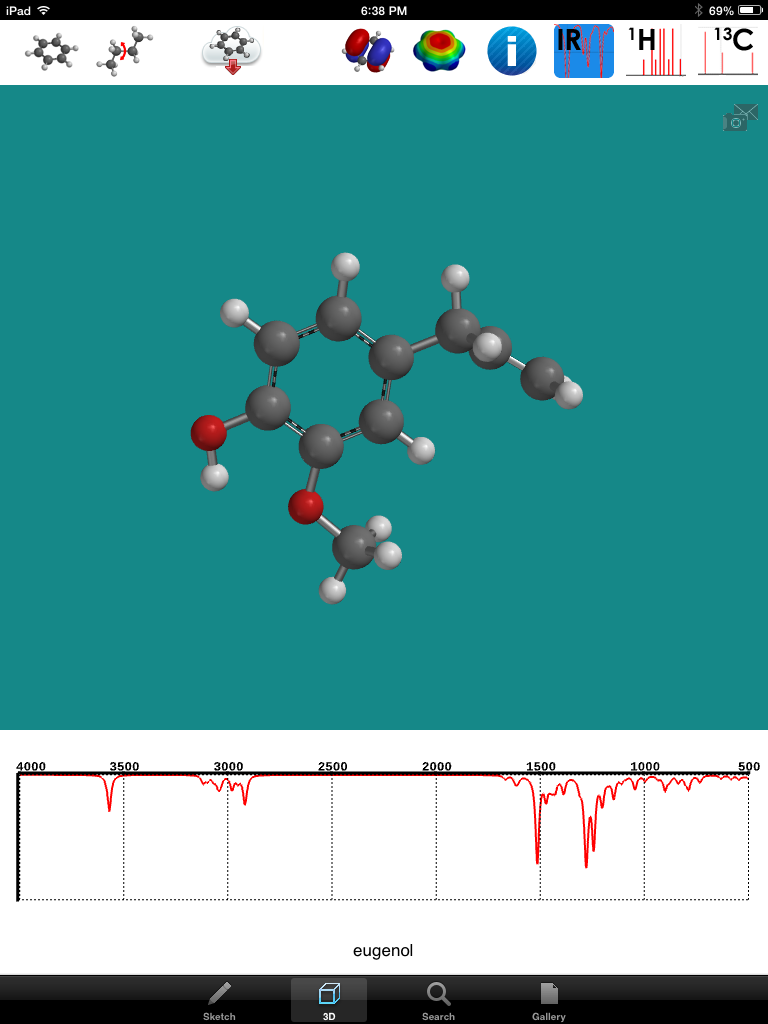
Steam distillation is a very common experiment done in organic chemistry labs everywhere. I like this experiment. We start with ground cloves and take out the essential oil eugenol. The room begins to smell of this wonderful molecule and it reminds me of pumpkin pie and all of those delightful smells of thanksgiving! Here is the structure of this molecule that can be found on the iPad app called "Nice Molecules":
I took a screenshot of the molecule and saved the image as a jpeg on my desktop iMac. I just marvel at the way molecules are put together and the way their structure produces their function. My students like that fact that we are not just performing steam distillation on any old molecule. Eugenol is something that is used every day and it allows me to demonstrate the relevance of chemistry to our whole life. The big challenge of using iPads in my organic chemistry class to produce digital lab reports has been time. It takes a lot of time for the students to learn the technology of an app like Explain Everything. It takes a lot of time to produce the video from their pictures and voice and all of the cool tools you have with this screen casting app. I had the students produce videos for simple and fractional distillation and one of the screencasts was almost 18 minutes long! I think they should be limited to about 7 minutes or so.
For steam distillation I decided to go a different direction. I just attended the CUE conference in Palm Springs and heard about the idea of using iMovie to make trailers. In this app there are templates that make it very easy to create these short, information-packed movies. I wanted to have my students be familiar with the technology of this app before they came to class so I assigned them to watch two YouTube videos on making trailers with the iPad app iMovie. They had to send me their evaluations of these "How to" videos via a google form. When they came to class the next day I told them that their quiz on the steam distillation lab was to create a short "documentary" or trailer using iMovie. Their creation had to describe the purpose, process and product of steam distillation of eugenol. The first movie is a trailer using the iMovie template. Be careful the music makes it very dramatic!
The second movie is not a trailer. The students simply used iMovie to make a quick video describing steam distillation in 90 seconds. Here it is:
At Cerritos College we have an "iPad work group" made up of faculty members and an IT guy who all received an iPad with the exhortation: "Go explore." I just love the attitude of the folks at my school. The work group is sort of like the old "skunk works" research group that engineering firms used to test and innovate new ideas. In February we met on a Friday for a workshop. this workshop was quite different from any I had attended, because it was run by students!
I used to think that teaching was essentially teacher centered. The teacher would convey knowledge in the form of lecture and the students would absorb it. Of course the students had to study in order to commit this knowledge to memory and deepen understanding, but this lecture model was the best way to teach in my mind. In short, this is teaching by telling.
It didn't work so well. I distinctly remember when I realized this many years ago. It was gas laws. Yes those gas laws get 'em every time! I thought I did it so well. I lectured with enthusiasm. I showed the "wow" kind of demos like the collapsing can. I lectured. I had them do the lab where the students calculate the molar volume of a gas. I lectured on the gas laws. I showed cool video demonstrations. I modeled the way to do calculations. I gave a quiz. The students all failed the quiz. Do you see the pattern here? I,I, I,I...I failed! But with failure comes learning.
The need for meaningful experience in the process of learning
It started to hit me when I asked my students. "You know when you are washing dishes and put a cup full of air upside down...what happens?"
"We have dish washers teacher!"
I realized my students did not have many of the experiences that I had had growing up that implicitly taught me about gases. So I decided to give them more experiences. Perhaps the reason they did not do well on the abstract calculations was because they did not understand the concepts behind the calculations!
The next year I ordered a set of Boyle's Law Apparatus. This is basically a syringe with a block on top and a block on the bottom so that you can stand it up freely. It also allows one to stack weights, like books, on top. It is very simple.
If you push on the blocks, you feel the invisible gas push back!
Finding Misconceptions
I then had the students draw diagrams, I called them "Black Box Diagrams", by which the student would have to draw what they imagined was what was going on inside the syringe at the molecular level. What they drew astounded me. I made them draw two diagrams, one with very little weight on the top block and one with lots of weight on the top block. The students were all over the map. Several drew the molecules as if they were balloons. With little external pressure on the apparatus the ballon-like molecules were large and with much pressure the balloon-like molecules shrunk! I had no idea they thought this way! They did not grasp the fundamental concept that the molecules are not changing at all. The molecules simply bump into each other more with increased pressure. Then I asked the students, "What is in between these molecules you drew." Almost unanimously I heard them answer, "Air!" I would always get one or two students in a class that would say, "Nothing, it's empty space." But again the majority proved that they had so many misconceptions about gases. (Sort of like I too had misconceptions about teaching and learning.)
But I realized that I intuitively had an understanding of gases that I had built up over years of experience and guidance from my teachers and through struggle. This made Charles' Law and it's algorithms in my mind just a natural and direct consequence of that intuition. My students did not have the same experiences. So either they came to an understanding of gases that had some misconceptions or they simply made up their theories. I suspect it was a little of both. Nevertheless they had ideas of gases that stood as a roadblock to understanding the abstract concepts of Boyle's, Charles' and Gay-Lussac's laws and the uses of them in calculations.
Our current understanding of the brain backs this up. We are constantly forming chemical connections between the proteins which make up our brain cells. Although I think learning is more than just brain chemistry, connections between brain cells are necessary. But what if a brain connection is made that represents a false idea? Would that pose a problem to developing a correct understanding? Is it possible that a misconception, "bad brain connection" must be disconnected and then reconnected in a new "good brain connection"?
If this is the case and much of brain research seems to say it is, then I need to have my students confront their misunderstandings about science (disconnect past connections in the brain) and form new connections that represent a more correct understanding of the science concepts.
Constructivist learning theory
This theory of learning is called in the academic world Constructivism. Now some will go so far as to say that students construct reality or students construct knowledge. I don't go that far. Knowledge of reality is something outside of me that is correct whether I say so or not. For example I don't construct knowledge of sulfuric acid. The knowledge of the reality about sulfuric acid is what it is no matter what I think. I certainly can have misconceptions of acid. That would have serious consequences. But I do think we construct our understanding of of this knowledge about such things as molecules and sulfuric acid.
Teacher as facilitator
And so my students construct their own understanding of of the world. I play a part in that by providing experiences for them, sharing my own experiences, giving lectures, asking them questions that make them think, etc. But I believe one thing for sure: My students don't come to me with blank slates for minds that I just fill in for them with my words. They have much prior understanding that I as a teacher must probe and understand so that I can help them understand abstract chemistry concepts. Often that probing reveals an incorrect understanding by one of my students. I think my job at that point is to create a learning experience for them in which they come face to face with that misconception and help them struggle to gain a better understanding. More and more I see my role as a facilitator of learning. This takes the focus off of me. The students' needs for forming good conceptions come to play a bigger role in what drive my teaching.
iPads help students construct knowledge
I think the iPads are a wonderful tool for students to develop their deeper understanding of scientific concepts. You can almost see the connections forming in their brains as they plan their presentation and begin to develop an explanation for the chemistry behind the experiment. This especially was visible to me when I had them produce a presentation in groups. Their wheels are really turning. They want to get it right! I have one student who produces high quality written lab reports that are very organized and the student gets good lab results, but sometimes this student does not quite explain the chemistry correctly. I have witnessed this student get better at it as time has gone on.
The current assignment was to create a digital lab report for simple and fractional distillation. In the presentation they had to explain the difference between the two types of distillation. These concepts are pretty high level. When writing a lab report, the discussion is pretty one-dimensional. But with a screen cast, there is verbal explanation but also diagrams, pictures, and graphs that the student must use to explain the chemistry. I think this is heavy construction! Can anyone say "physical chemistry" without flinching?
Students own their learning
In Organic Chemistry I have wanted my students to create digital lab reports that demonstrate this deep understanding. The biggest challenge for most has not been the chemistry, it has been learning how to use the iPads and the apps. The term "digital native" might not be as good a description as I once expected. But by the middle of the semester I think my students have arrived at the point where they are producing some high quality screencasts. Usually we spend two days on distillation, one for simple and one day for fractional. But this time I thought I would try to do both in one day and give the students the other three hour lab period for working on their screen cast. The students made a good start on their screencasts in three hours but most needed more time. I told them that they could come in any time I am on campus and check out an iPad. I also gave them a week to complete the assignment. Most of them either used their own iPads, I think six students either had their own at the beginning of the semester or convinced their mom and dad to get them one, or they borrowed one from a friend. Of fifteen students only one was unable to complete turn in the screen cast URL on the due date. I let this student have the extra time needed to get it done. I could see the student was getting stressed out and taking it very seriously so I had no problem giving extra time. Here are some of the best screencasts using the app Explain Everything.
You can see that each student took a different approach to explaining the difference between simple and fractional distillation.
Where to go from here
We are now well over half way through the semester. I still think it is very important that the students write. I want them to write well. I tell them that they will probably forget much of the chemistry they learn in my class. But there are two more important things I want them to learn. The first is how to learn. If I can equip them to be learners of difficult concepts on their own, what more could I want. Well I also want them to be good communicators. This involves both speaking, clearly articulating heavy concepts in a way that is understandable, and it involves writing, making a claim and backing it up with solid evidence.
I plan to have the students create their own lab reports for the caffeine extraction lab. And I think I want to have them create one more report after that, perhaps a synthesis that involves explaining the mechanism. I also want to give them at least one more "digital quiz" before the semester ends. Now that they have spent so much effort learning the technology, I want them to feel like they can create a good presentation of heavy chemistry easily. Stay tuned.
Just before I first started out as a high school chemistry teacher I really thought I knew my material. After all I had four years of college level chemistry behind me. How could teaching high school be that hard. But I soon realized that passing a written test on some content, even with a good grade, is not anything close to explaining that concept at an understandable level to 35 energetic high school students in the period right after lunch. I remember after a few days of my first teaching job saying to myself, "I really need to know this stuff a lot better!" Some days I would be what we call "just 10 minutes ahead of the students." On top of that I would get a question from a good student that would just stump me. And then there was this one student that everyday kept saying, "Mr. Bradbury, I just don't understand!" I must confess that I let that student exasperate me at times. I would try one explanation and then another and then an example. And the student just kept saying, "But I don't understand!"
Teaching a concept requires a whole deeper level of understanding. I have often wished I could give my students and oral exam where each one has to get up in front of the class and explain a concept to everyone else. But then again that can be terrifying! I remember when my Algebra 1 teacher made me get up in front of my whole class one late September school day during a typical late summer Southern California heat wave. There was no air conditioning in classrooms back then. I remember wilting under the pressure! The only thing that saved me was that I could face the chalkboard and not my classmates. But I could still feel the arrows of their stares on my back. I wanted to climb under my desk. I learned that I clearly did not understand Algebra!
Or was it that I was so full of fear in front of the class that I could not have performed even if I had all the necessary knowledge.
Nevertheless I think the best proof of deep understanding of a concept is being able to clearly articulate that concept in a very relaxed conversational manner. Screencasting allows just this. One of the most difficult concepts in chemistry is Molecular Orbital Theory. Understanding MO theory requires an accumulated knowledge, the ability to think abstractly, and the ability to see and draw three dimensional objects in two dimensions.
Screencasting can be an "equalizer"
The other thing that screencasting allows is a bit of privacy. The students can really wrestle with concepts on their own. Then they get to prepare their presentation, explain it and edit their explanation. (Hey, as a teacher I take lots of time to prepare myself!) The pressure is low. What my colleagues and I are finding is that some of the best screencasts are produced by some of the "forgotten" students that sit quietly in the back of class hoping the teacher will never call on them. Screencasting lets everybody have a chance to shine.
The Assignment I decided to have my students create a screencast of their explanation of how to draw the hybridization box diagram and molecular orbital diagrams of a particular molecule or ion. This is no easy task! I must say it is a challenge for me to do it. Even more it is a huge challenge to draw intricate diagrams on the iPad. Here is the specific assignment.
1. Draw the box diagrams showing the ground state, excited state and hybridized state for your assigned molecule or ion as shown in class. Show the VSEPR structure. Label all orbitals and show the relative energy of each. State the type of hybridization (sp2 etc.)
2. Draw the contour diagram for the assigned molecule. Label angles and label orbitals. No credit will be given if drawn incorrectly. Show orbital overlap correctly and show electrons. Make all drawings large. State the shape of the molecule. http://tinyurl.com/luw
Teacher Expectations Exceeded (Big Time!) I had a three hour block of lab time. Secretly I hoped that they would take about an hour and then we could continue working on our chemistry experiment. But I was so surprised, yet again, by how seriously they took this assignment. Some of them spent over an hour just planning and preparing how they were going to present their explanation. Most of them had already completed the assignment on paper. Some of the students went over the three hours and a few asked if they could keep the iPads during the 1 1/2 hour lunch break.
They really put me to shame. When I do a screencast that is say five minutes long I will spend no more than ten minutes on the whole process. Yes I am more experienced and so I take less planning, but when I saw what some of these students had done I must say I was overwhelmed. When I compare their work to some of my screencasts I just want to crawl under a rock! Here are a few that were created on Educreations. (The Educreations posts are not as easy to embed in a blog as are ShowMe screencasts) Even if you have no idea what a molecular orbital is I think you will be very impressed by the work of these students. They do a fantastic job of presenting. And this isn't just two plus two equals for this is very high level stuff. What level on Blooms Taxonomy do you think this hits?
These students really took pride in their work. Some of them were very interested in my response to their work. I think they felt like they really accomplished something intellectually significant. I think they did!
iPad workout part 2: Working on a digital lab report in Organic Chemistry
Last semester I told my students to create a digital lab report for my Organic Chemistry class. At that time I had no class set of iPads and only one or two students had their own. Most of the lab reports were created with a desktop or laptop. But now with the iPads I think this could be a lot easier. So for the distillation lab I told my students that they would be doing a digital lab report. Everything that is covered in a regular written lab report must be presented in a screencast. I recommended the app Explain Everything. The big hurdle is that the students are not allowed to take home the iPads, although 4 or 5 have their own. Usually we do two distillations, simple and fractional. We do these distillations over two days. But simple distillation often goes so fast, and the real hold up is setting up the apparatus. This time I decided to do both distillations in one day. They would have to work quickly, but they would only have to add the fractional column for the second distillation. By doing this in one day it opened up a whole three hour lab period for working on the digital lab report.
Again, these students spent a good deal of time just prepping for their screen cast. They uploaded text and pictures and diagrams. I was impressed with their hard work. In the end the three hours was not enough time for them to complete the lab report. This was good for me to learn. Normally they have to spend significant time outside of class working on the report anyway. But many of them do not have iPads of their own. (Although they seem to be appearing more and more as the semester goes on. Way to go parents!)
Several students asked if they could come in the following week to work on the report. So what I chose to do was give them one week to complete the digital report and send me the link. I think some or many of them will come and borrow an iPad while I am on campus in another class or in my office hour. So part 2 is to be continued...
Seeking and Finding: Two very good apps Molecular Orbital Modeling with Mols Editor
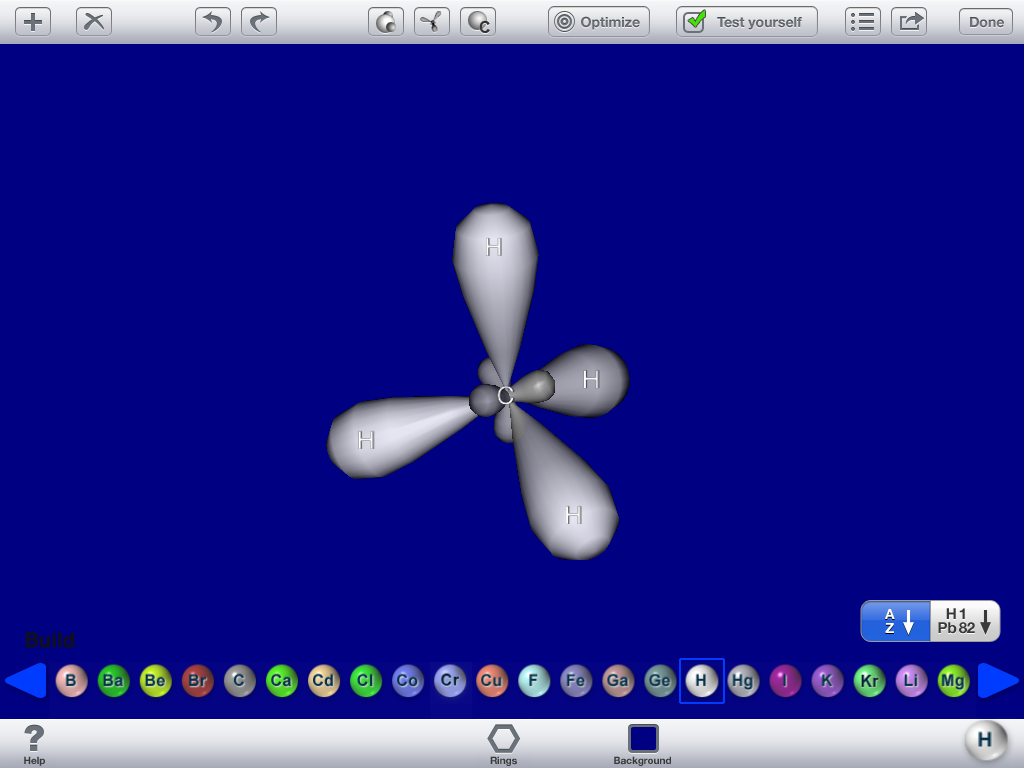
There are so many apps out there for modeling molecules. For my General Chemistry class I want to build simple molecules and be able to look at them three-dimensionally. I also want to be able to look at the molecular orbital contour diagrams. So far the best app for this has been Mols Editor. In previous posts I have shown the basic 3-D structure. Now I want my students to draw those crazy contour diagrams. These are hard to visualize and draw because they are so abstract and 3-D on top of that. Mols editor lets you build the molecule and then there is an button to display the molecular orbitals. Here is a picture of methane CH4.
You can see result of the SP3 hybridization of carbon and the overlap with the hydrogen 1s orbitals. My students found this very helpful. Of course even harder to draw and visualize are the double and triple bonded molecules. Here is an example of ethene C2H6.
Because the app lets you rotate the molecule it is very easy to see and then attempt to draw. Why didn't they have this stuff when I was suffering through Gen Chem!!! And I had to walk barefoot in the snow to school... Well it makes it easier to teach anyway.
Bond Angles and R/S configuration and Spectra with iSpartan
I also want to show my students the bond angles. Unfortunately Mols editor does not yet display bond angles. At least I have not seen that yet. But another app called iSpartan lets you draw the molecule and then it renders the molecule in 3-D. It also allows you to analyze bond angles, R and S configuration and it shows the NMR and Infrared spectra. Here is an example of finding the bond angle.
When you highlight three connected atoms (circled in above photo) the app automatically calculates the bond angle. As you can see in the picture of CBr4, which is tetrahedral, the bond angle is 109.5 which is correct. I figured this app out a little too late for my current General Chemistry students, but maybe I will use it next semester.
If a particular atom is chiral the app tells if the arrangement is the R or S. This is of particular interest to my Organic Chemistry students. Here is a screenshot of bromo-chloro-fluro-iodomethane. And you can see it is the S-configuration of it.
The last thing I want to point out about iSpartan is that you can also obtain the spectra of various molecules if they are in the available database. Next week we are doing the steam distillation lab of cloves. We will extracting Eugenol. I am happy to say that this molecule is in the data base. So my students can run the IR on their extracted sample and then compare it to the one on the app.
As you can see in the upper left corner, H-NMR and C-NMR also are available.
So for me, Mols Editor and iSpartan are two of the best apps for molecular modeling. There are others that I will "review" later. The one downside of iSpartan is the cost. Currently it runs around $20. Mols Editor has three versions. One is free. The one I am currently using is $1.99. I find it to be quite adequate. The third version has self-testing. It costs $4.99. I have not been able to find that as useful as I had hoped to yet. But these two apps really, to me anyway, really enhance my job of teaching a science that is 3-dimensional. Chemistry teaching will never be the same once this type of tool catches on!